Wednesday, September 30, 2009

Useful GPS Information


The Global Positioning System (GPS) is a satellite-based navigation system made up of a network of 24 satellites placed into orbit by the U.S. Department of Defense. GPS was originally intended for military applications, but in the 1980s, the government made the system available for civilian use. GPS works in any weather conditions, anywhere in the world, 24 hours a day. There are no subscription fees or setup charges to use GPS.

How it works

GPS satellites circle the earth twice a day in a very precise orbit and transmit signal information to earth. GPS receivers take this information and use triangulation to calculate the user's exact location. Essentially, the GPS receiver compares the time a signal was transmitted by a satellite with the time it was received. The time difference tells the GPS receiver how far away the satellite is. Now, with distance measurements from a few more satellites, the receiver can determine the user's position and display it on the unit's electronic map.
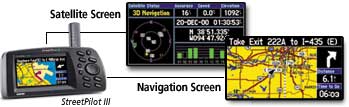
A GPS receiver must be locked on to the signal of at least three satellites to calculate a 2D position (latitude and longitude) and track movement. With four or more satellites in view, the receiver can determine the user's 3D position (latitude, longitude and altitude). Once the user's position has been determined, the GPS unit can calculate other information, such as speed, bearing, track, trip distance, distance to destination, sunrise and sunset time and more.

How accurate is GPS?

Today's GPS receivers are extremely accurate, thanks to their parallel multi-channel design. Garmin's 12 parallel channel receivers are quick to lock onto satellites when first turned on and they maintain strong locks, even in dense foliage or urban settings with tall buildings. Certain atmospheric factors and other sources of error can affect the accuracy of GPS receivers. Garmin® GPS receivers are accurate to within 15 meters on average.
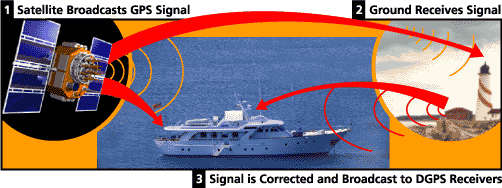
Newer Garmin GPS receivers with WAAS (Wide Area Augmentation System) capability can improve accuracy to less than three meters on average. No additional equipment or fees are required to take advantage of WAAS. Users can also get better accuracy with Differential GPS (DGPS), which corrects GPS signals to within an average of three to five meters. The U.S. Coast Guard operates the most common DGPS correction service. This system consists of a network of towers that receive GPS signals and transmit a corrected signal by beacon transmitters. In order to get the corrected signal, users must have a differential beacon receiver and beacon antenna in addition to their GPS.
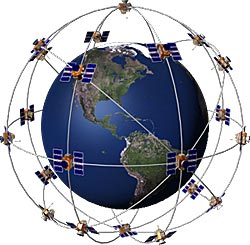
The GPS satellite system

The 24 satellites that make up the GPS space segment are orbiting the earth about 12,000 miles above us. They are constantly moving, making two complete orbits in less than 24 hours. These satellites are travelling at speeds of roughly 7,000 miles an hour.

GPS satellites are powered by solar energy. They have backup batteries onboard to keep them running in the event of a solar eclipse, when there's no solar power. Small rocket boosters on each satellite keep them flying in the correct path.

Here are some other interesting facts about the GPS satellites (also called NAVSTAR, the official U.S. Department of Defense name for GPS):

  • The first GPS satellite was launched in 1978.
  • A full constellation of 24 satellites was achieved in 1994.
  • Each satellite is built to last about 10 years. Replacements are constantly being built and launched into orbit.
  • A GPS satellite weighs approximately 2,000 pounds and is about 17 feet across with the solar panels extended.
  • Transmitter power is only 50 watts or less.

What's the signal?

GPS satellites transmit two low power radio signals, designated L1 and L2. Civilian GPS uses the L1 frequency of 1575.42 MHz in the UHF band. The signals travel by line of sight, meaning they will pass through clouds, glass and plastic but will not go through most solid objects such as buildings and mountains.

A GPS signal contains three different bits of information — a pseudorandom code, ephemeris data and almanac data. The pseudorandom code is simply an I.D. code that identifies which satellite is transmitting information. You can view this number on your Garmin GPS unit's satellite page, as it identifies which satellites it's receiving.

Ephemeris data tells the GPS receiver where each GPS satellite should be at any time throughout the day. Each satellite transmits ephemeris data showing the orbital information for that satellite and for every other satellite in the system.

Almanac data, which is constantly transmitted by each satellite, contains important information about the status of the satellite (healthy or unhealthy), current date and time. This part of the signal is essential for determining a position.
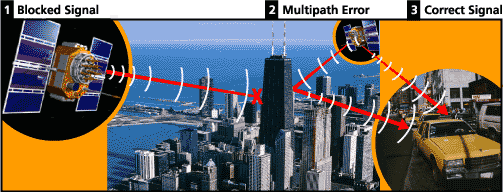
Sources of GPS signal errors

Factors that can degrade the GPS signal and thus affect accuracy include the following:

  • Ionosphere and troposphere delays — The satellite signal slows as it passes through the atmosphere. The GPS system uses a built-in model that calculates an average amount of delay to partially correct for this type of error.
  • Signal multipath — This occurs when the GPS signal is reflected off objects such as tall buildings or large rock surfaces before it reaches the receiver. This increases the travel time of the signal, thereby causing errors.
  • Receiver clock errors — A receiver's built-in clock is not as accurate as the atomic clocks onboard the GPS satellites. Therefore, it may have very slight timing errors.
  • Orbital errors — Also known as ephemeris errors, these are inaccuracies of the satellite's reported location.
  • Number of satellites visible — The more satellites a GPS receiver can "see," the better the accuracy. Buildings, terrain, electronic interference, or sometimes even dense foliage can block signal reception, causing position errors or possibly no position reading at all. GPS units typically will not work indoors, underwater or underground.
  • Satellite geometry/shading — This refers to the relative position of the satellites at any given time. Ideal satellite geometry exists when the satellites are located at wide angles relative to each other. Poor geometry results when the satellites are located in a line or in a tight grouping.
  • Intentional degradation of the satellite signal — Selective Availability (SA) is an intentional degradation of the signal once imposed by the U.S. Department of Defense. SA was intended to prevent military adversaries from using the highly accurate GPS signals. The government turned off SA in May 2000, which significantly improved the accuracy of civilian GPS receivers.

Monday, September 28, 2009

LINUX vs. WINDOWS

From my research, there is to many comparison of Linux and Windows. It can serve as an introduction to Linux for Windows users. Here I list down some of the comparison :


1)Flavors

Both Windows and Linux come in many flavors. All the flavors of Windows come from Microsoft, the various distributions of Linux come from different companies (i.e. Linspire, Red Hat, SuSE, Ubuntu, Xandros, Knoppix, Slackware, Lycoris, etc. ).

Windows has two main lines. The older flavors are referred to as "Win9x" and consist of Windows 95, 98, 98SE and Me. The newer flavors are referred to as "NT class" and consist of Windows NT3, NT4, 2000, XP and Vista. Going back in time, Windows 3.x preceded Windows 95 by a few years. And before that, there were earlier versons of Windows, but they were not popular. Microsoft no longer supports Windows NT3, NT4, all the 9x versions and of course anything older. Support for Windows 2000 is partial (as of April 2007).

The flavors of Linux are referred to as distributions (often shortened to "distros"). All the Linux distributions released around the same time frame will use the same kernel (the guts of the Operating System). They differ in the add-on software provided, GUI, install process, price, documentation and technical support. Both Linux and Windows come in desktop and server editions.

There may be too many distributions of Linux, it's possible that this is hurting Linux in the marketplace. It could be that the lack of a Linux distro from a major computer company is also hurting it in the marketplace. IBM is a big Linux backer but does not have their own branded distribution. Currently there seem to be many nice things said about the Ubuntu distribution.

Linux is customizable in a way that Windows is not. For one, the user interface, while similar in concept, varies in detail from distribution to distribution. For example, the task bar may default to being on the top or the bottom. Also, there are many special purpose versions of Linux above and beyond the full blown distributions described above. For example, NASLite is a version of Linux that runs off a single floppy disk (since revised to also boot from a CD) and converts an old computer into a file server. This ultra small edition of Linux is capable of networking, file sharing and being a web server.


2) Graphical User Interface

Both Linux and Windows provide a GUI and a command line interface. The Windows GUI has changed from Windows 3.1 to Windows 95 (drastically) to Windows 2000 (slightly) to Windows XP (fairly large) and is slated to change again with the next version of Windows, the one that will replace XP. Windows XP has a themes feature that offers some customization of the look and feel of the GUI.

Linux typically provides two GUIs, KDE and Gnome. See a screen shot of Lycoris and Lindows in action from the Wal-Mart web site. The lynucs.org web site has examples of many substantially different Linux GUIs. Of the major Linux distributions, Lindows has made their user interface look more like Windows than the others. Here is a screen shot of Linux made to look like Windows XP. Then too, there is XPde for Linux which really makes Linux look like Windows. Quoting their web site "It's a desktop environment (XPde) and a window manager (XPwm) for Linux. It tries to make easier for Windows XP users to use a Linux box."

Mark Minasi makes the point (Windows and .NET magazine, March 2000) that the Linux GUI is optional while the Windows GUI is an integral component of the OS. He says that speed, efficiency and reliability are all increased by running a server instance of Linux without a GUI, something that server versions of Windows can not do. In the same article he points out that the detached nature of the Linux GUI makes remote control and remote administration of a Linux computer simpler and more natural than a Windows computer.


3)Text Mode Interface

This is also known as a command interpreter. Windows users sometimes call it a DOS prompt. Linux users refer to it as a shell. Each version of Windows has a single command interpreter, but the different flavors of Windows have different interpreters. In general, the command interpreters in the Windows 9x series are very similar to each other and the NT class versions of Windows (NT, 2000, XP) also have similar command interpreters. There are however differences between a Windows 9x command interpreter and one in an NT class flavor of Windows. Linux, like all versions of Unix, supports multiple command interpreters, but it usually uses one called BASH (Bourne Again Shell). Others are the Korn shell, the Bourne shell, ash and the C shell (pun, no doubt, intended).


4)Security

Linux [has] ... the notion of an administrative (root) user that maintains and operates the system, and desktop users who only run the software on the system, is completely ingrained in most Linux distributions. Now it’s true that many Linux users ignore these features and run all their software from a root-level account anyway, but that’s a choice that they’ve made. The system defaults to protecting the operating system components from its user’s actions (intentional or otherwise). That feature alone must account in large degree for the dearth of viruses and other malicious vermin on Linux and UNIX platforms. Windows, on the other hand, started life as a single user system, with that single user being all-powerful. Although that’s no longer the case, the general attitude can still be found in many Windows-based software products – many of which just can’t be installed and/or run properly without desktop administrator privileges. This is all changing for the better, but it took Microsoft far too long to adopt this default-secure configuration practice.

Source Linux vs. Windows: Which is Most Secure? (March 2007) Kenneth van Wyk.


For this moment only these few comparison I listed down. Will update soon..


Sunday, September 27, 2009

Hack Windows Vista Logon Account Password In 3 Minutes

  1. Reboot the Windows Vista and boot up with Windows Vista installation DVD.
    Crack Windows Vista logon account password in minute with the Windows Vista installation DVD. Click on the Repair Your Computer option, bring up Command Prompt to open Local Users and Groups management in MMC.
  2. While the Windows Vista installation interface pops up, click the Repair You Computer link at the bottom-left corner.
  3. Next, the System Recovery Options dialog box appears. There are few options that related to repairing Windows Vista, looks like Recovery Console in Windows XP:
    Startup Repair options is used to automatically fix problems that are preventing Windows Vista from starting.

    System Restore to restore Windows Vista setting to an earlier point in time.

    Windows Complete PC Restore to restore Windows Vista from a full system backup.

    Windows Memory Diagnostic Tool could be the first Microsoft memory tester toolkit that bundled with Windows setup media.

    Command Prompt is the target option of this Vista hacking guide. Click on this option now.
  4. In the Vista Command Prompt, type mmc.exe and press ENTER key to bring up the Microsoft Management Console.
  5. Click on the File menu, select Add / Remove Snap-in option, locate and select the Local Users and Groups on the left panel, and click Add button to add it to the right panel.
  6. Now, the Choose Target Machine dialog box pop up. Keep the default setting by clicking the Finish button – that means using the Local Users and Groups snap-in to manage this local computer, and not another computer in network.
  7. Click OK button and return to MMC windows. Under the Root Console in left panel, double-click Local Users and Group that was added earlier. Click on User folder, locate and right-click the target Vista logon account that found in the right panel.
Select the Set Password from the right-click menu to set a new password / reset old password.

Friday, September 25, 2009

How to Write a Batch File For Windows

  1. Open up Notepad in Windows. You can do this by navigating to Start > Programs > Accessories > Notepad, or simply by entering notepad under Start > Run.
  2. Or open up notepad by C:\WINDOWS\system32\notepad.exe
  3. Save your file before anything, so be sure to follow the instructions closely.

    1. Go to File > Save As... and chose a file name.
    2. Choose your desktop as the location to save, for now. Don't click Save just yet.
    3. Click on the dropdown menu next to "File name". Select "All files" instead of Text Document".
    4. Add .bat to the end of your file name before you save. For example, you would type example.bat.
    5. Click on Save. If you did this correctly, you should see your file name in the title of Windows Notepad. Make sure that it reads as example.bat—not example.bat.txt. Now you are ready to create your batch file.
  4. Type "@echo off" on the first line of your batch file. This will prevent any spaces in the batch file to be read by the program when executed.
  5. Enter your commands. The following example below will show you how to create a batch file that will automatically load wikiHow.com using Internet Explorer.
    • @echo off.
    • REM The following will open wikiHow.com in a new Internet Explorer window.
    • "start Iexplore.exe www.wikihow.com"
    • REM The following will open wikiHow.com in your default browser, but if it is IE and you have another IE window open, then it will hijack that window.
    • "start www.wikihow.com"
  6. Save the file by going to "File>Save" and type in "wikihow.bat".
  7. Run the file by double clicking the file on your desktop.


Setup Virtual Network Drive

If the drag and drop functionality has been included as part of your Freestyle deployment, follow the steps below to setup your virtual folders.

As with the web-based system, the virtual drive requires you to enter your secure Freestyle username and password for access.

Thursday, September 24, 2009

Ghost Story..

Hantu Arwah Gentayangan


i dont really believe with this ghost picture, i can't determine which is the ghost. if we watch at the left side of the picture we can found some thing strange which appear and looked like a pocong ghost. but when we move to the right side of the picture, there we can find there is a strange light which is looked like the light of a jin ghost which usually appear as a spirite or the piwer of mystical material. this picture is not so scary but it so interested to be talked at this blog.

Penampakan Hantu Wewe Di Sekolah Serem Banget


i was really impressed by this ghost picture, when the first time i watch this ghost picture i remember one of the most scary movie. it is the ring ghost. do you still remember with the ring ghost? yes when i watch this ghost picture, then i remember with the ring ghost. this is just looked like a japan ghost which appear as a woman with white skin and long black hair. she have a long black finger and she wear a white dress. she look so perfect like a kuntilanak ghost. but i dont really believe that this ghost is true ghost picture :)

Asap Yang Mirip Hantu Kuntilanak

This is one another kuntilanak ghost which i write on this blog. as we know that kuntilanak ghost is the ost wanted ghost to view. i know it from te information that i got from the shutbox that there so many people who afraid with kuntilanak ghost. kuntilanak ghost also clasified as woman ghost. their appearance is looked like a wewe ghost and sundel bolong ghost. based on the kuntilanak ghost the movie kuntilanak was a ghost which is looking for her cildren. which die when she was pregnan. she was born in the yard.

Penampakan Hantu Kuntilanak Di Sebuah Lorong


This is one another kuntilanak ghost after so long time i stop to write on this blog. look at the ghost picture that seems like a real ghost picture is not it? but how can this ghost be? it is really imposible for some one to capture a ghost picture as close and as near as this picture. can yu imagine when you are alone and then when you anter some room you are shocked with the appearance of this ghost. like on the movie then you will be huned every time and you will be fear for ever you can not sleep deeply.

Song Of The Day..Saat Terakhit by ST12

ST12 – Saat Terakhir

tak pernah terpikir olehku
tak sedikit pun ku menyangka


kau akan pergi tinggalkan ku sendiri
*courtesy of LirikLaguIndonesia.net
begitu sulit ku menyangkal
begitu sakit ku rasakan
kau akan pergi tinggalkan ku sendiri


* di bawah batu nisan kini kau tlah sandarkan
kasih sayang kamu begitu dalam
sungguh ku tak sanggup ini terjadi


karna ku sangat cinta

** ini lah saat terakhirku melihat kamu
jatuh air mataku menangis pilu
hanya mampu ucapkan selamat jalan kasih


satu jam saja ku telah bisa
cintai kamu kamu kamu di hatiku
namun bagiku melupakanmu
butuh waktuku seumur hidup


satu jam saja ku telah bisa
sayangi kamu di hatiku
namun bagiku melupakanmu
butuh waktuku seumur hidup di nantiku


repeat **


satu jam saja ku telah bisa
cintai kamu kamu kamu di hatiku
namun bagiku melupakanmu
butuh waktuku seumur hidup


satu jam saja ku telah bisa
sayangi kamu di hatiku
namun bagiku melupakanmu
butuh waktuku seumur hidup


Download full MP3 at

http://www.4shared.com/file/135228638/cceee1d0/Saat_Terakhir.html

and video at http://www.youtube.com/watch?v=BlRKCUjucjI